For the pull request that says nothing about tests
A pull request should say which of its new lines no test ran.
Bitbucket Pipelines runs your tests and the pull request shows a green or red build. It does not show coverage, which changed lines were tested, or the tests that passed. Coverage for Bitbucket adds one pipe to your test step. On the pull request you then see changed-line coverage, the change against the target branch, the uncovered lines marked in the diff, and every test with its output. Nothing leaves Bitbucket.
Free on every workspace. Bitbucket Cloud apps are not billed through the Marketplace.
Read-only. No token in your pipeline, and the app declares no external network access.
- Works in
- Bitbucket Cloud
- Runs on
- Atlassian Forge
- Your data
- Never sent to us
- Price
- Free
The gap this fills
BCLOUD-15935 — show code coverage in pull requests — has 429 votes. Its neighbours ask to see the output of tests that passed, not only the failures (BCLOUD-15716, 357 votes), and for test reports beyond the first 100 failures (BCLOUD-20312). Bitbucket's own test report still lists failed cases only.
So reviewers approve a change without knowing whether anything tested it. Coverage lives in a CI log or an HTML report nobody opens, and it slides a point at a time until someone notices.
Capabilities
What it does
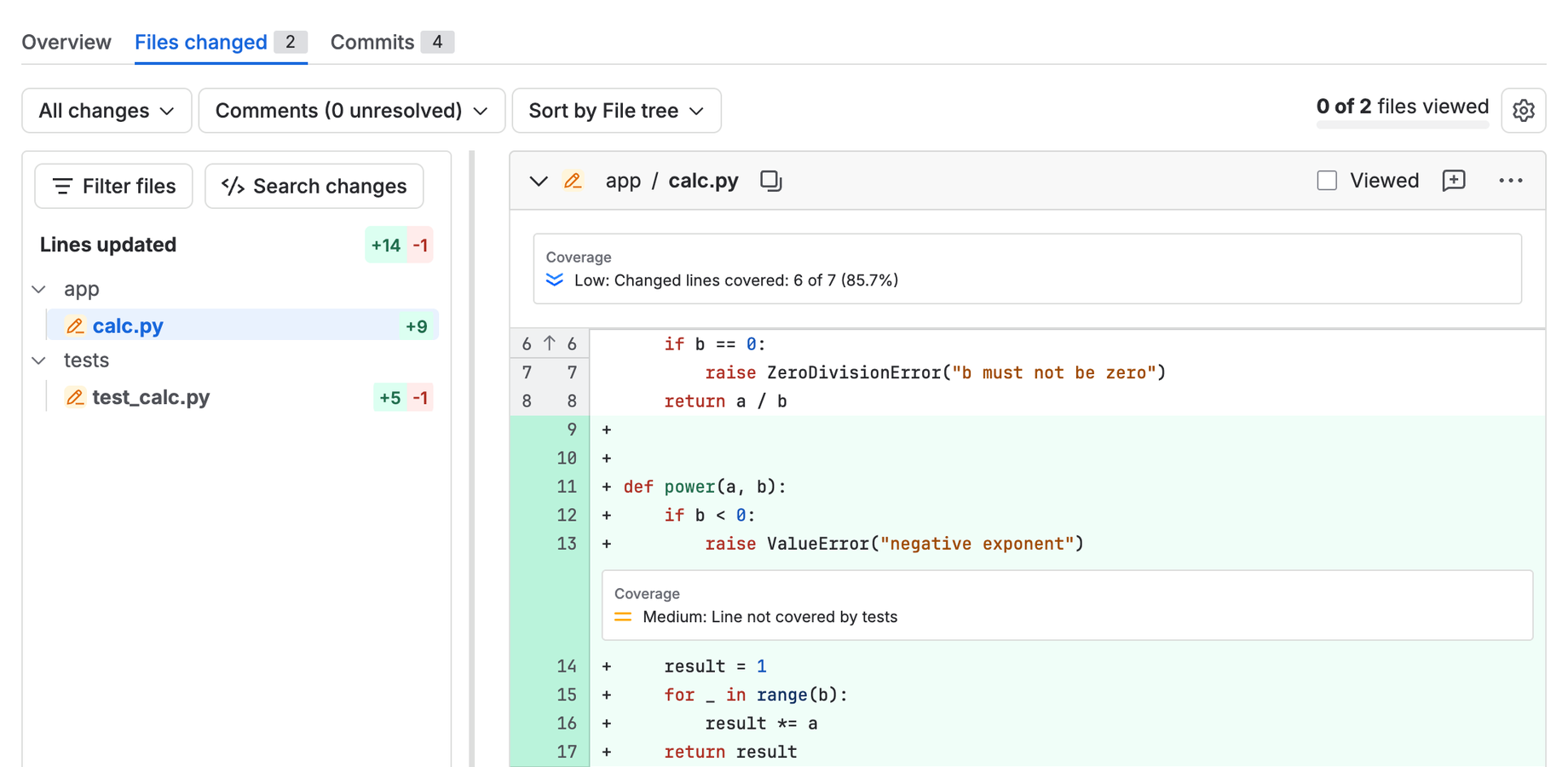
Untested lines, marked in the diff
Each range of changed lines that no test ran is marked where the reviewer reads the code, with the file's changed-line totals beside it.
Coverage of the change, not just the repository
Line coverage for the whole build and for the lines this pull request changed, so a small, untested change in a big, well-tested codebase still shows.
The change against the target branch
The panel compares the pull request with the latest report on the branch it merges into, and says how many points coverage moves.
Every test, with its output
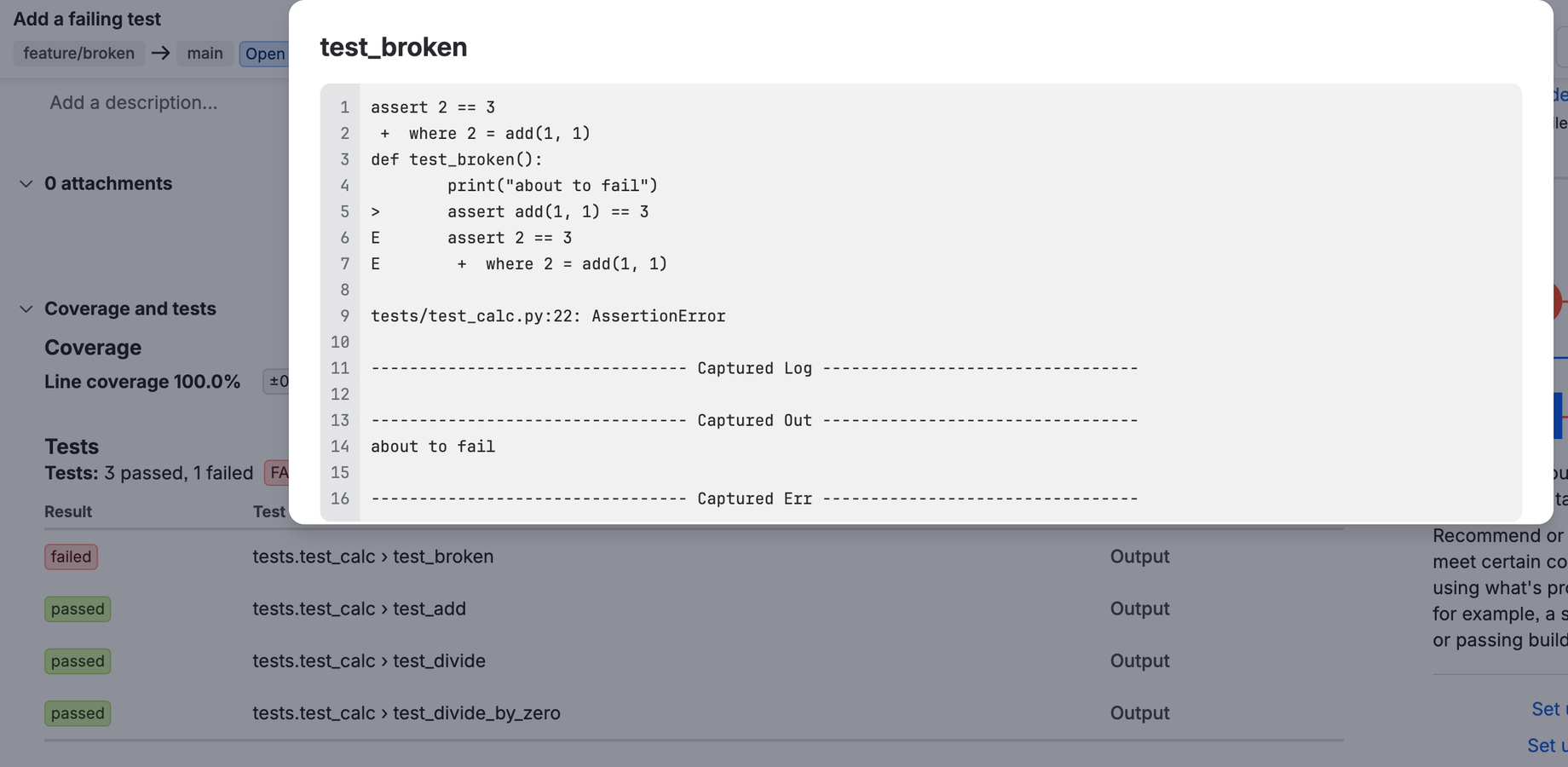
Every test from your JUnit XML, failures first, passed and skipped ones too. Open any of them to read what it printed.
A merge check for coverage
"Coverage meets the bar" shows on the pull request whether coverage is under the thresholds you set in the pipeline, or dropped more points than you allow. On Bitbucket Premium, make it required and it blocks the merge.
Four coverage formats, no token
Cobertura, JaCoCo, LCOV and Go coverprofiles. The pipe writes through the Pipelines proxy, so there is no secret to create or rotate.
On the pull request
Every test, with what it printed
Walkthrough
From a green build to a reviewed one
-
Install the app on your workspace
Install it as a workspace administrator. It adds a panel and a card to every pull request in the workspace, and a merge check that stays off until you turn it on.
-
Add the pipe to your test step
Put it in the step's
after-script, so it still runs when a test fails, and pointCOVERAGE_FILEat your coverage report. JUnit XML in the usual folders is found by itself. -
Open a pull request
The diff marks untested changed lines. The Coverage and tests panel on the Overview tab has the numbers, the files and the tests.
-
Optional: block merges
Enable custom merge checks once in Workspace settings, then add "Coverage meets the bar" in Repository settings → Custom merge checks. On Bitbucket Premium, tick required to block merges that fail it.
Compared honestly
Against what Bitbucket does today
| Question | Bitbucket Cloud | Coverage for Bitbucket |
|---|---|---|
| Coverage on the pull request? | No — a Code Insights report only if you build one | Overall and changed-line coverage, in a panel and a card |
| Which changed lines no test ran? | No | Marked in the diff |
| Tests that passed? | A count; only failed cases are listed | Every test, with its output |
| Block a merge on coverage? | No | A merge check, with thresholds and an allowed drop (blocking on Premium) |
Limits
Limits we state up front
It reads what your build writes. Coverage comes from the coverage file your tests produce; the app does not run your tests or instrument your code.
Bitbucket Pipelines, or a token. In Pipelines the pipe needs no credentials. Another CI can run the same image with a repository access token.
Code Insights limits apply. A report carries at most 1,000 annotations, so a change with more uncovered ranges than that, or a build with more than 1,000 tests, shows the first 1,000 and says so. Failures come first.
Line coverage only. Branch coverage is not reported in this release.
Availability
Free, on every Bitbucket Cloud workspace.
A workspace administrator installs Coverage for Bitbucket from Atlassian's install page in one click. There is no paid tier: Bitbucket Cloud apps are not billed through the Marketplace.
-
Prove who can access what in Jira — at a point in time.
AccessLens for Jira Runs on Atlassian
-
The work that has to happen every month, happening every month.
Recur for Jira Runs on Atlassian
-
Six emails about one issue, folded into one summary.
Digest for Jira Runs on Atlassian